



6.2.1. Via standard form of adding sea loads
To add sea loads click on the Sea section and then click on Add loads.
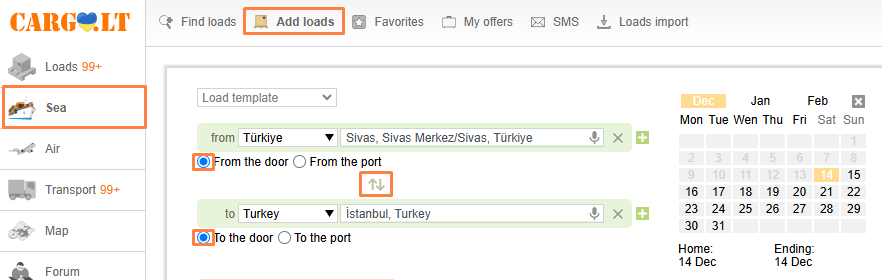
And fill in the following fields:
1. Loading and unloading destinations.
In the from field indicate loading point, and in the to field indicate unloading.
_en.png)
Choose the continent, and then choose your country from the dropdown list, or you could enter a city name or Zip-code.
_en.png)
If choosing a city, you may also choose a specific port.
_en.png)
If you have a groupage, add an additional loading / unloading point by clicking on icon Add.
Good to know:
Change places – Swapping Loading / Unloading locations.
From Door / To door or Port / To port. If your load requires transport to another port, inform this to the operator in the Door / To door section.
2. Loading/Unloading Dates. You may indicate loading and unloading dates up to three months ahead.
_en.png)
To change dates click on Remove (in the top right of the calendar).
3. Type of load. In the drop down list load types will be shown.
_en.png)
Insert the load weight by hand, if needed insert extra parameters.
4. Additional Information. If required, you may insert additional information in the Additional information field. It is prohibited to add phone numbers or third parties in the additional tab. It is also possible to attach files to the offer, for that click the Attach icon.
_en.png)
Good to know:
Contact. You are automatically chosen as the contact. If you want to change the contact to another co-worker of your company (from the dropdown list), then only he will be able to edit the offer.
_en.png)
5. Type of payment. Choose a payment type out of the available: Upon unloading, after delivery or advance payment. Insert price.
_en.png)
6. Priority offer. For your offer to take priority over others and be shown in a highlighted color above others, click on the Priority offer option. This is a paid option.
_en.png)
Reset button: All the filled-in information is deleted.
Add button: The offer is added to the system.
To see all you offers is available my clicking My offers.


