




4.1.3. Loads on the map
To display active loads of your company or any other company, go to the Map section and click the tab Loads on the map.
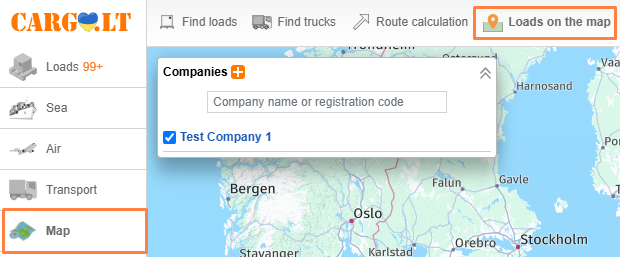
To display loads of another company of interest, click the icon Add company and enter its name or code. You can later disable or enable the display of loads of selected companies by ticking the boxes. You can delete the company from the list by pressing the Delete company icon near its name.
_en.png)
The map shows departure points of loads. When you hover your mouse cursor over it, the route will appear. By clicking on them, you will see complete information about the load and its destination. Here you can also click the messenger icon and send an inquiry regarding the load.
_en.png)
This option is a useful tool for carriers who only work with specific trusted companies. This system is also useful for those companies who specialize in shipping and forwarding and also have branches in various cities. This will enable you to see loads of the specific company on the map from all of its seperate branches.
To display loads from specific managers of a company, click the company name and tick the corresponding managers.
_en.png)


