




4.7. Actions with offers in the load or truck search
You can manage offers in the load or truck search using the Notes and actions function, located in the Customer column.
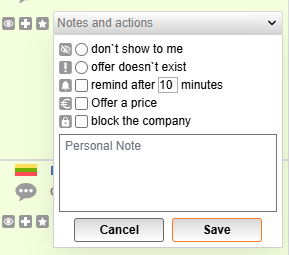
Don’t show to me: Offers marked with this will no longer show up on the search report.
Offer doesn’t exist: If you contact a company, but there is no longer an existing load or truck offer, or the offer parameters are not accurate. You can mark such offers as “doesn’t exist.” The offers that receive 2 marks from various users will be automatically removed from the database. The rating of the user who posted an inaccurate or incorrect offer, or who failed to remove a no longer active offer will have his company rating lowered.
Remind after N minutes: You can set a reminder for the selected offer. You will get a notification with a reminder with “to do” note after a specific set timer time (for example, call the cargo owner in 10 minutes).
Offer price (not available for loads from partner systems): to offer a price for load transportation, click offer price, select a currency, and type the amount.
Block the company (not available for loads from partner systems): select this option, and offers from the said company will not be displayed when you search for loads or trucks.
Personal note: if necessary, leave a note on the offer which will only be visible to you only.
Offer seen: to mark a load or truck offers you have already seen, click on the icon Reviewed.
_en.png)
The offer will go colourless.
_en.png)
Offer selected: to make a temporary list of offers of interest, press the Offer selected.
_en.png)
All selected offers will be compiled into a uniform list in the Selected tab among the search results by filter.
If you go to another page or section, the Selected tab will not be preserved.
Favorite offer: to add offers you want to track to your Favorite section, press the icon Favorite.
_en.png)
The offers marked by you will be saved in the Favorites tab in Loads or Trucks sections.


